
Download iPi – Free Pi Calculator for Windows, Mac, Android & iOS
Overview of iPi
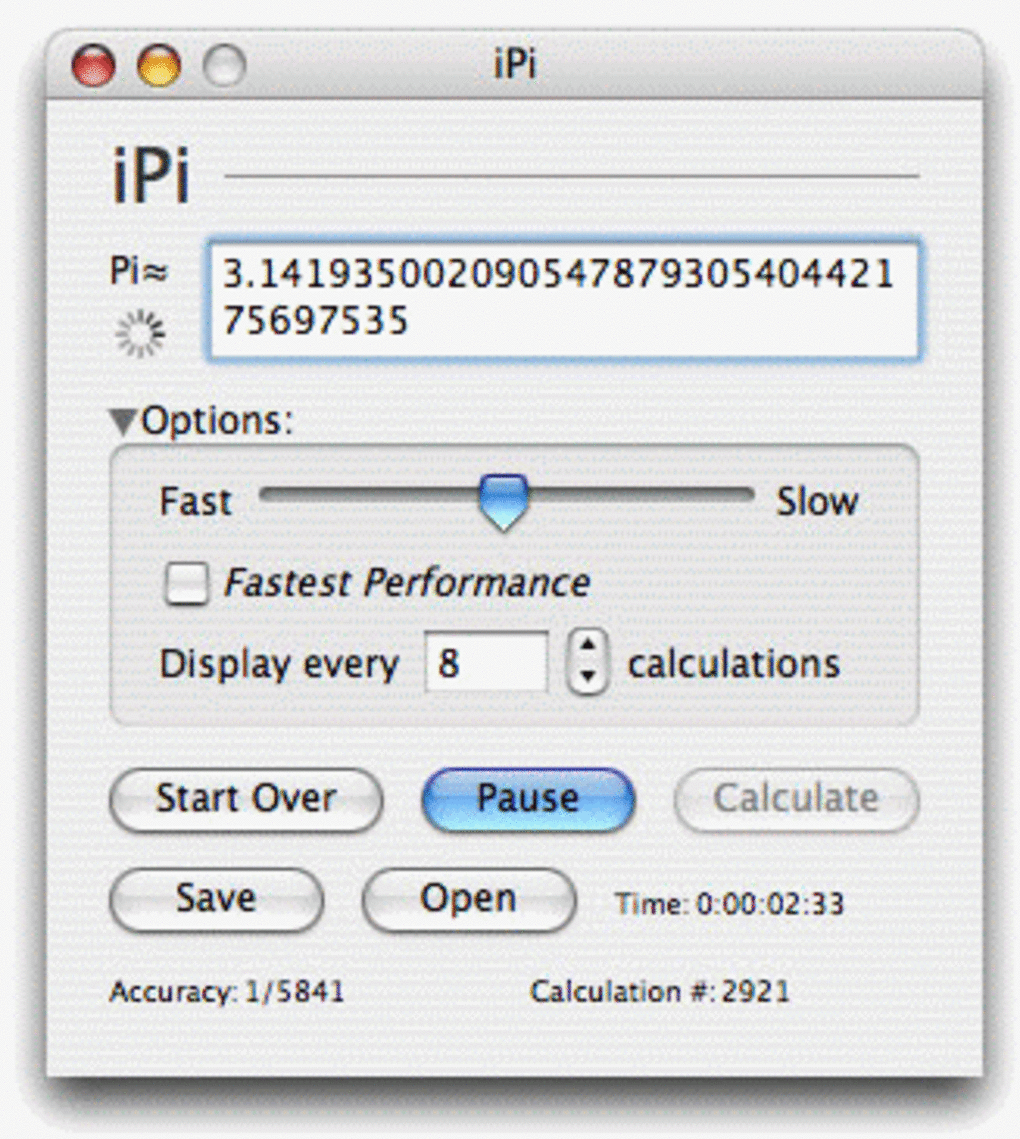
iPi is a lightweight, free‑of‑charge application designed to calculate the mathematical constant π (Pi) using the classic Leibniz series 4 × (1 – 1/3 + 1/5 – 1/7 + … + (–1)ⁿ / (2n + 1)). The tool targets anyone who needs a quick, reliable value of Pi without the overhead of a scientific calculator or a heavy‑duty math package. Its single‑window interface strips away unnecessary clutter, presenting just one button – “Calculate” – and a slider that lets you allocate processing power on the fly.
If you prefer the absolute fastest computation, a “Fastest performance” toggle takes care of the optimisation automatically. Once the calculation starts, iPi continuously refines the approximation, allowing you to observe the convergence in real time. When you’re satisfied with the precision, you can save the result to a text file for later reference or simply start a new calculation with the “Reset” button.
Because the app is built on open‑source principles, it remains free, secure, and regularly updated to keep pace with the latest operating‑system releases. Whether you’re a student revisiting high‑school math, a teacher demonstrating series convergence, or a hobbyist programmer checking floating‑point limits, iPi offers a no‑frills, dependable way to compute Pi on virtually any platform.
Key Features & Benefits
- Simple One‑Click Calculation: Initiate the Leibniz series with a single press of the “Calculate” button.
- Adjustable Processing Slider: Dynamically allocate CPU resources to speed up or slow down the computation based on your device’s capabilities.
- Fastest Performance Mode: One‑click activation of the optimal settings for the quickest Pi approximation.
- Real‑Time Convergence Display: Watch the value of Pi gradually approach its true value as more terms are processed.
- Save Results: Export the current approximation to a plain‑text file for documentation or further analysis.
- Cross‑Platform Compatibility: Available for Windows, macOS, Android, and iOS, ensuring you can calculate Pi wherever you work.
- Zero Cost & No Ads: Completely free to download and use, with no hidden fees or intrusive advertising.
- Secure Updates: Regular, signed updates keep the application safe from vulnerabilities.
- Lightweight Footprint: Requires less than 10 MB of disk space and runs efficiently on low‑end hardware.
These features collectively create a user‑centric experience that emphasizes speed, transparency, and accessibility. By focusing on the core mathematical operation, iPi avoids the bloat that often accompanies multi‑function calculators, making it ideal for educational settings where clarity is paramount. The adjustable slider also serves a pedagogical purpose: students can experiment with the trade‑off between computational effort and precision, gaining intuition about series convergence and performance tuning. Moreover, because the app is free and open‑source, educators can safely install it on school computers without worrying about licensing constraints or privacy concerns. In short, iPi delivers a targeted solution that bridges the gap between theoretical mathematics and practical, on‑the‑fly computation.
Installation & Usage Guide
Getting iPi up and running is straightforward, regardless of whether you are on a desktop or mobile device. Follow the steps below to ensure a smooth installation and start calculating Pi within minutes.
Desktop (Windows & macOS)
- Visit the official iPi download page and click the “Download for Windows” or “Download for macOS” button.
- Once the installer (
.exefor Windows or.dmgfor macOS) finishes downloading, locate the file in your Downloads folder. - Double‑click the installer. On Windows, you may need to confirm the User Account Control prompt; on macOS, drag the iPi icon to the Applications folder.
- After installation, launch iPi from the Start menu or the Applications folder. The first launch may request permission to access your file system for saving results – grant this permission to enable the “Save” feature.
- In the main window, press the Calculate button. The app will begin processing the Leibniz series. Use the slider beneath the button to adjust the processing intensity; sliding to the right allocates more CPU cores, accelerating convergence.
- If you want the absolute fastest computation, tick the “Fastest performance” checkbox. iPi will automatically optimise thread usage based on your hardware.
- When the displayed value reaches the desired precision (e.g., 3.14159 for five decimal places), click Save to export the number to a
.txtfile, or press Reset to start a fresh calculation.
Mobile (Android & iOS)
- Open the Google Play Store (Android) or the Apple App Store (iOS) and search for “iPi Pi Calculator”.
- Tap Install and wait for the download to complete.
- Launch the app from your home screen. The interface mirrors the desktop version, with a large Calculate button, a processing slider, and a “Fastest performance” toggle.
- Tap Calculate**.** The app will begin approximating Pi in real time. Adjust the slider if you notice lag or if you wish to conserve battery life.
- When satisfied, use the Save button to store the result in your device’s Documents folder or share it via the native share sheet.
- To start over, simply press Reset**.**
iPi requires no additional libraries or runtime environments; the installer bundles all necessary components. For best performance on older machines, keep the processing slider toward the middle range and avoid enabling “Fastest performance” unless you have a multi‑core CPU. Regularly check for updates via the built‑in “Check for Updates” menu item to benefit from performance patches and security fixes.
Compatibility, Pros & Cons
iPi runs natively on the following operating systems: Windows 10/11 (64‑bit), macOS 10.15 Catalina and later, Android 8.0 (Oreo) and above, iOS 13 and later. The application has been tested on both Intel and ARM architectures, ensuring smooth operation on the latest Apple Silicon Macs and Android devices powered by Qualcomm Snapdragon or MediaTek processors.
Pros
- Completely free with no hidden charges.
- Extremely lightweight – installs in under 10 MB.
- Intuitive single‑window UI that requires no learning curve.
- Adjustable processing power lets you balance speed and resource usage.
- Cross‑platform support covers the majority of consumer devices.
- Real‑time convergence visualization aids teaching and learning.
- Secure, signed updates keep the software safe from tampering.
- No ads, trackers, or unnecessary permissions.
Cons
- Lacks advanced mathematical functions beyond Pi calculation.
- No built‑in graphing or visualization beyond the numeric display.
- Precision limited by the Leibniz series; very high precision requires many iterations.
- Command‑line or API access not provided, which may limit automation.
- Saving results only supports plain‑text format; no CSV or JSON export.
Overall, the pros far outweigh the cons for the target audience—students, educators, and casual users who need a reliable Pi approximation without the overhead of a full‑blown mathematics suite. The simplicity of iPi is its strongest selling point, while the limited feature set is an intentional design choice that keeps the app fast and secure.
Frequently Asked Questions
Is iPi really free or are there hidden in‑app purchases?
iPi is 100 % free. There are no premium tiers, no subscription fees, and no hidden in‑app purchases. All features—including the “Fastest performance” mode—are available to every user after download.
How accurate is the Pi value generated by iPi?
iPi uses the Leibniz series, which converges slowly. The accuracy depends on how many terms you allow the app to process. With the “Fastest performance” setting on a modern CPU, you can reach 7‑8 decimal places within a few seconds. For higher precision, you would need to let the calculation run longer or switch to a faster‑converging algorithm, which is outside iPi’s design scope.
Can I use iPi on a Linux system?
Official builds are currently provided for Windows, macOS, Android, and iOS. However, the source code is open‑source, and community members have compiled unofficial versions for Linux. Check the GitHub repository for instructions if you wish to run iPi on a Linux distribution.
Does iPi store any personal data or require an internet connection?
No. iPi is a completely offline tool. It does not collect, transmit, or store any personal data. The only time the internet is used is when you manually check for software updates via the built‑in update feature.
How do I report a bug or request a new feature?
You can open an issue on the official GitHub repository. The development team monitors the issue tracker regularly and encourages community contributions through pull requests.
Conclusion & Call to Action
iPi delivers exactly what its name promises: a personal, hassle‑free way to calculate Pi. Its no‑frills interface, adjustable performance controls, and cross‑platform availability make it an ideal companion for anyone who needs a quick, reliable approximation of π without the distractions of a full‑scale scientific suite. Whether you’re teaching series convergence in a classroom, verifying a programming algorithm, or simply satisfying curiosity, iPi provides a secure, free, and continuously updated solution. Download iPi today and experience the simplicity of real‑time Pi calculation on your preferred device. Click the appropriate download button for your operating system, run the installer, and start exploring the infinite digits of Pi in seconds.







